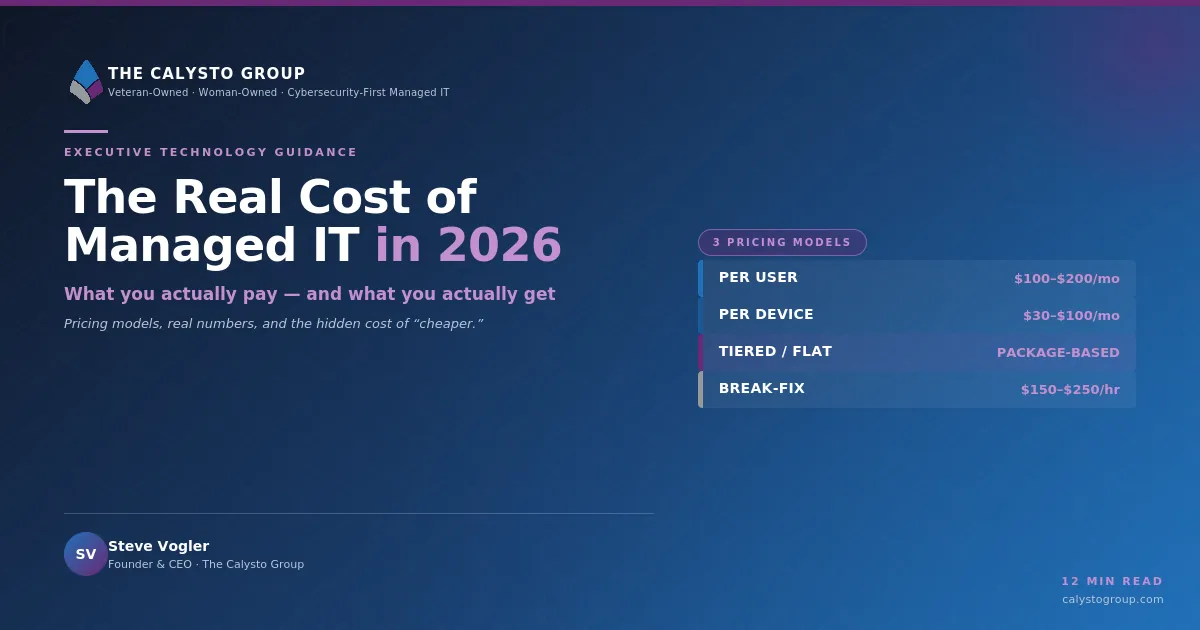
Real Cost of Managed IT Services in 2026
Managed IT Services, IT Cost Breakdown, Pricing Transparency
The Real Cost of Managed IT Services in 2026: A Plain‑English Breakdown
If you are trying to budget for Managed IT Services in 2026, you have probably seen numbers all over the map. This guide walks through the real IT cost breakdown in plain English—what per-user pricing means, how per-device models work, what is bundled versus add-on, why cybersecurity now shows up as its own line item, what to expect for Business IT Onboarding, and what “too cheap” pricing usually signals. We will also run the numbers for a 30-person and a 100-person business and answer the question every owner asks: “Why is this more than I’m paying now?”
The Two Big Pricing Models: Per-User vs. Per-Device
Most Managed IT Services providers in 2026 price their services using one of two primary models: Per-user Pricing or per-device pricing. Some firms blend both, but understanding these two foundations will make every proposal easier to compare.
Per-user Pricing: The Most Common Model in 2026
In a per-user model, you pay a fixed monthly fee for each employee who uses company IT resources. Typical rates in 2026 run between $100 and $250 per user per month, with many small and mid-sized businesses falling in the $125–$200 range. Market analyses show that organizations with 20–200 employees often land around $125–$175 per user, while more complex or highly regulated environments can push toward the top of the range or beyond it.
Why providers like this model:
It scales smoothly as you add or remove staff.
It reflects reality: more people mean more tickets, onboarding, offboarding, and support time.
It makes budgeting straightforward—your IT cost grows with headcount, just like payroll and benefits.
Per-device Pricing: Paying for Each Endpoint and Server
In a per-device model, you pay based on the number and type of devices the provider manages. Typical 2026 ranges look like this:
Workstations / laptops: roughly $50–$120 per device per month.
Servers: often $150–$400 per month, depending on whether they are on-premises or cloud-based and how critical they are.
Network devices (firewalls, switches, wireless controllers): commonly $75–$250 per device per month.
Per-device pricing is sometimes used when you have a lot of shared workstations, specialized equipment, or a mix of internal IT and outsourced support. It can be attractive if you have fewer devices than users or if your workforce is highly mobile and device-heavy.
📌 Key Takeaway: Per-user Pricing is usually simpler and more predictable. Per-device can work well for unique setups but can also become complex to track over time.
What Is Typically Bundled vs. Sold as an Add-on?
When you see a monthly Managed IT Services quote, you are not just paying for “someone to fix computers.” The bundle usually includes a mix of support, tools, and ongoing maintenance. Understanding what is bundled and what is extra is the heart of Pricing Transparency.
Commonly Bundled Services (the “Base” Package)
Help desk and user support during business hours (phone, email, remote support).
Endpoint management (patching, updates, remote monitoring of PCs and laptops).
Basic network monitoring for firewalls, switches, and internet connectivity.
Vendor management for internet, phone, and major software providers (“We’ll open tickets with them so you don’t have to.”)
Standard reporting on ticket volumes, device health, and basic asset inventory.
Typical Add-ons (Where Costs Creep Up)
Advanced cybersecurity tools and services (beyond basic antivirus), such as endpoint detection and response (EDR), 24/7 security operations center (SOC) monitoring, and threat hunting.
Cloud backup and disaster recovery for servers, Microsoft 365, and critical applications.
Compliance support (HIPAA, PCI-DSS, SOC 2, etc.), including documentation and regular audits.
24/7 or after-hours support instead of business-hours only coverage.
vCIO / strategic consulting for quarterly planning, budgeting, and technology roadmaps.
💡 Pro Tip: When comparing Managed IT Services quotes, ask for a one-page IT cost breakdown that clearly labels “included” versus “optional” items. This avoids surprises later.
Why Cybersecurity Is Increasingly Its Own Line Item
Five years ago, many business owners assumed “security” was baked into general IT support. In 2026, that assumption is risky. The cybersecurity landscape has changed dramatically: attacks are more sophisticated, the cost of a breach is higher, and regulations are stricter. As a result, Cybersecurity Costs now appear as a separate section in most proposals.
Industry research shows the global managed security services market growing at double-digit rates. That growth reflects the investment providers must make in specialized tools, 24/7 monitoring, and highly skilled analysts. Those costs cannot be absorbed into a low, flat per-user fee without cutting corners elsewhere.

Photographic realistic close-up of dual computer monitors in a dimly lit operations center, one...
Dedicated security tools and staff now account for a growing share of IT budgets.
Practically, this means you will often see cybersecurity priced as an add-on per user—for example, an extra $30–$70 per user per month for advanced security stacks in security-sensitive markets. This may include:
Next-generation antivirus / EDR on each endpoint.
Centralized log collection and 24/7 monitoring for suspicious activity.
Multi-factor authentication setup and management.
Security awareness training and phishing simulations for staff.
📌 Key Takeaway: If your quote does not clearly list cybersecurity services and tools, assume they are minimal. In 2026, robust security almost always has its own line item—and its own price.
What Business IT Onboarding Really Costs
Beyond monthly fees, most providers charge a one-time onboarding fee to bring your environment into their systems. In 2026, this often ranges from $3,000 to $25,000, depending on size and complexity. That is a wide range, so it helps to understand what you are paying for.
A full network and security assessment (documenting devices, configurations, vulnerabilities, and risks).
Deployment of management agents on all supported devices (PCs, laptops, servers).
Building out documentation—network diagrams, password vaults, asset lists, and configuration baselines.
Stabilization work to fix urgent issues before assuming full responsibility (such as replacing a failing firewall or cleaning up malware).
Some providers discount onboarding to win the deal, but be cautious of quotes that show little or no onboarding cost. Either they are planning to absorb significant unpaid work (and recover it later) or they will skip important steps, which can lead to unstable service and surprise projects in the first year.
What Cheap Pricing Usually Signals
Everyone wants a good deal, but in Managed IT Services the very lowest quotes often come with trade-offs. When you see pricing that is far below the typical $100–$250 per user per month range, it is worth asking what is missing or where corners are being cut.
Limited scope: The provider may only cover remote support and basic monitoring, with on-site visits, projects, and security billed separately at higher hourly rates.
Minimal cybersecurity: Antivirus only, no 24/7 monitoring, no advanced threat detection, and no meaningful incident response capabilities.
Overloaded teams: Very low prices can indicate that technicians are supporting far too many endpoints, leading to slow response times and reactive, not proactive, service.
Hidden extras: You may be quoted a low monthly fee but later discover charges for every change request, after-hours call, or basic project.
💡 Pro Tip: Cheap pricing is not automatically bad, but it demands a closer look at the service description. Ask the provider to walk through a recent security incident they handled and how it would be billed under your agreement.
Worked Example: Managed IT Services for a 30-Person Business
Let us put real numbers to all of this. Imagine a 30-person professional services firm—say, an architecture, accounting, or engineering company—with typical needs: Microsoft 365, a line-of-business application, a small on-premises server, and a hybrid of office and remote work. They want predictable costs, solid cybersecurity, and business-hours support with after-hours coverage for emergencies.
Per-user Pricing Scenario for 30 Users
Suppose you receive a quote of $175 per user per month, which sits comfortably in the mid-range for small and mid-sized businesses with moderate complexity.
30 users × $175 per user = $5,250 per month for Managed IT Services.
This might include:
Unlimited remote and on-site support during business hours.
Proactive patching, monitoring, and maintenance of all PCs and laptops.
Management of one or two servers and core network devices.
Basic cybersecurity (standard antivirus, firewall management, secure configurations).
Now add a dedicated cybersecurity package at, say, $40 per user per month for advanced EDR, 24/7 SOC monitoring, and security awareness training:
30 users × $40 per user = $1,200 per month for enhanced cybersecurity.
Total ongoing monthly cost: $5,250 + $1,200 = $6,450 per month, or about $77,400 per year.
Onboarding Cost for 30 Users
A typical onboarding fee for this size and complexity might be in the $5,000–$10,000 range. Let us assume $7,500 one-time. That covers discovery, documentation, agent deployment, network cleanup, and initial security hardening.
Worked Example: Managed IT Services for a 100-Person Business
Now consider a 100-person manufacturing or multi-location services company with a mix of office staff, plant floor PCs, and remote workers. They have more servers, more line-of-business systems, and possibly some regulatory requirements. Their environment is more complex, but they also benefit from some economies of scale.
Per-user Pricing Scenario for 100 Users
For a 100-user organization, it is common to see slightly lower per-user rates than for very small businesses, but the added complexity of multiple locations and legacy systems can offset that. Let us assume a blended rate of $165 per user per month for core Managed IT Services.
100 users × $165 per user = $16,500 per month.
This might include:
Unlimited support with faster response-time SLAs and some 24/7 coverage for critical systems.
Management of multiple servers (on-prem and cloud), plus more complex networking across sites.
Regular vCIO meetings for strategic planning and budgeting.
For cybersecurity, this type of organization is more likely to invest in a full security stack. Assume $50 per user per month for advanced EDR, SOC monitoring, MFA management, and security awareness training:
100 users × $50 per user = $5,000 per month for cybersecurity.
Total ongoing monthly cost: $16,500 + $5,000 = $21,500 per month, or about $258,000 per year.
Onboarding Cost for 100 Users
Onboarding for a 100-user, multi-site environment is naturally more involved. A realistic range might be $15,000–$25,000. Assume a $20,000 one-time fee covering a full assessment, documentation, agent deployment, security hardening, and remediation of legacy issues before going live.
“Why Is This More Than I’m Paying Now?”
This is the most common—and most reasonable—question business owners ask when they see a Managed IT Services quote. If you are currently spending much less than the examples above, here are the honest reasons a new quote may be higher:
You are underinvesting today. Many smaller firms limp along with a single internal “IT person” plus a break-fix provider. The monthly spend looks low, but downtime, slow systems, and security gaps quietly cost far more in lost productivity and risk.
The scope is broader. A modern managed services agreement usually includes proactive monitoring, patching, strategic planning, and documented processes—not just putting out fires when something breaks.
Cybersecurity expectations have changed. What counted as “secure enough” a few years ago is no longer acceptable to insurers, regulators, or many customers. Advanced security tools and 24/7 monitoring add real cost, but they also reduce the odds of a business-threatening incident.
Labor and tooling costs have risen. Skilled IT and security staff command higher salaries, and the professional-grade tools required to run a modern IT operation—ticketing, monitoring, backup, security platforms—are not cheap. Those costs are built into your per-user or per-device fee.
In other words, if your current IT spend is well below the typical $100–$250 per user per month range, you are probably trading away something: response time, security, stability, or strategic planning. A higher quote is not automatically better, but it often reflects a more complete and mature IT program.
Bringing It All Together: What You Should Expect to Pay in 2026
For most small and mid-sized organizations in the United States, a realistic 2026 budget for Managed IT Services looks like this:
Per-user Pricing: Plan on $125–$200 per user per month for a solid, all-around managed services package, with security-heavy or highly regulated environments leaning higher.
Cybersecurity add-ons: Allocate an additional $30–$70 per user per month if you are adopting a modern security stack with 24/7 monitoring and advanced tools.
Onboarding: Expect a one-time project between $3,000 and $25,000, depending on your size and how much cleanup and documentation are required.
📌 Key Takeaway: Instead of chasing the lowest monthly number, focus on aligning your Managed IT Services package with the level of reliability, security, and strategic guidance your business truly needs.
Managed IT Services are not just an expense line; they are an operational foundation. A transparent IT cost breakdown—covering Per-user Pricing, per-device options, cybersecurity costs, and Business IT Onboarding—helps you compare providers on equal footing and choose the partnership that will best protect and enable your business in 2026 and beyond.